
在按进度收款账单工具中创建自动结算期
- 最后更新
- 另存为PDF
对于美国的 Procore 客户
当你的公司应用"业主英语"或"专业承包商英语"视点词典时,你将在用户界面中看到不同的工具名称和术语变更。了解如何应用词典选项。
- 了解差异:显示/隐藏
-
此表显示了项目财务管理视点词典中的工具名称(粗体)和术语的差异。这些词典仅提供美国英语版本。默认词典是为总承包商设计的,这意味着你需要与公司的 Procore 管理员以及你的 Procore联系人合作才能访问其他词典选项。
总承包商
英语(美国)- 默认
业主
英语(业主术语 V2)
专业承包商
英语(专业承包商术语)
开发票 开发票 按进度收款账单 业主 资金 业主 业主/客户 业主/客户 总承包商/客户 主合同变更通知单 资金变更通知单 客户合同变更通知单 主合同 资金 客户合同 收入 资金 收入 分包合同 合同 分包合同 分包商 承包商 分包商 分包商分项价格表 (SSOV) 承包商分项价格表 (CSOV) 分包商分项价格表 (SSOV)
-
目标
为项目的分包商发票创建自动结算期。
背景
A Billing Period defines the billing cycle used by a project's team and invoice contacts on Procore's invoices and progress billings. In addition to defining the frequency of the billing cycle (for example, monthly or weekly), a billing period also defines the billing cycle's start/end date and the due date for the invoice or progress billing.
Examples
Common billing periods include:
- Monthly
Examples of common monthly billing periods are below:- Starts on the 1st day of a month and ends on the 30th of the same month.
- Starts on the 15th of one month and ends on the 14th of the following month.
- Weekly
Examples of common weekly billing periods are below:- Starts on Sunday of this week and ends on Saturday of this week.
需要考虑的事项
- Required User Permissions
-
- When you create a new billing period Procore automatically sets:
- The new billing period's status to Open.
- The previous billing period's status to Closed.
- There can only be one (1) billing period in the Open status at any given time.
- You can only create billing periods in the Project level Invoicing tool.
- You cannot create or manage billing periods at the Company level.
- These Invoice Management features rely on billing periods:
- To create a new invoice, a Procore project must have one (1) Open billing period. See Create a Subcontractor Invoice.
- To compile subcontractor invoice backups, keep all previously invoiced billing periods in the 'Billing Periods' table in the Closed status. Compile Subcontractor Invoice Backups with the Invoicing Tool. Never delete a billing period after it's linked to an invoice. See Edit Billing Periods.
- To automatically complete amounts on owner invoices with data from other Procore tools, billing periods and dates on supported financial items must match the billing period dates on the invoice. See How does Procore automatically complete amounts on an upstream invoice?
- When you create a new billing period Procore automatically sets:
先决条件
步骤
- 导航到项目级别发票工具。
- 可选:点击结算期标签页。
- 点击创建结算期。
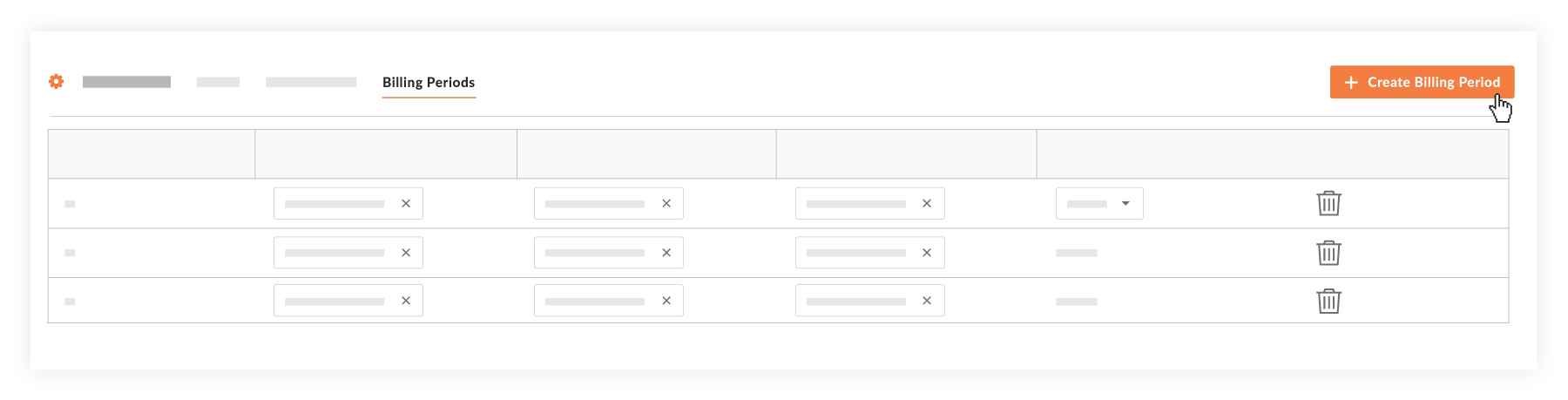
- 在"设置结算期"提示中,可以使用手动标签页 默认活动。
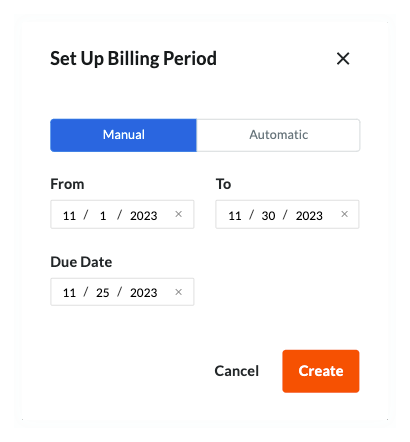
- 在手动标签页中,接受默认结算期日期或选择其他日期以:
- 从。设置新结算期的开始 日期。
注意
在此结算期为未完成时创建发票,"开始"日期会自动填充新发票上的"期间开始"字段。 - 至。设置新结算期的结束日期。
注意
在此结算期为未完成时创建发票时,"截止"日期会自动填充新发票上的"期间结束"字段。 - 截止日期。 设置新结算期内新发票提交的截止日期。
注意
- 在此结算期为"未完成"的情况下创建发票时,"截止日期"字段中的日期会填充新发票上的"期间开始"字段。
- 未完成结算期的"截止日期"过去后,请注意:
- 发票联系人无法再创建或提交发票。 此外,如果发票 管理员将分包商发票置于草稿或修改并重新提交状态,则发票联系人只能编辑分包商发票。
- 只有发票管理员保留创建分包商发票的能力。
- 从。设置新结算期的开始 日期。
- 点击创建。
Procore 创建新的结算期并将其状态设置为打开。Procore 还会自动将上一个结算期设置为已关闭。

