跳转到主内容
Procore

照片

照片工具使你能够在安全的在线存档中轻松拍摄、存储和共享你的项目照片。 你可以使用智能手机或平板电脑快速拍摄进度照片、添加标记,并即时与其他团队成员共享。

  • 从智能手机、平板电脑或计算机获取并上传照片
  • 存储无限数量的数字照片并按类别整理
  • 自动备份你的照片
  • 向所有或特定团队成员授予访问照片的权限
  • 使用移动设备在现场为照片标记详细信息和备注

There are no items that match your search query.

 Tip

To browse and search all Procore training videos, visit our video library.

Web

Upload Photos
 
Manage Photos
 

Mobile

Photos Overview (Mobile)
 

OUTDATED VIDEOS - Removed from Support Site and Certifications

Configure Photo Settings


Configure Photos


Video content may not accurately reflect the current state of the system, and/or it may be out of date.

Photos Mobile


Video content may not accurately reflect the current state of the system, and/or it may be out of date.

Photo Management


Video content may not accurately reflect the current state of the system, and/or it may be out of date.

Specialty Contractor as Client - Upload Photos


Video content may not accurately reflect the current state of the system, and/or it may be out of date.

Specialty Contractor as Client - Photos (Mobile)


Video content may not accurately reflect the current state of the system, and/or it may be out of date.

Owner - Manage Photos


Video content may not accurately reflect the current state of the system, and/or it may be out of date.

Owner - Photos Mobile


Video content may not accurately reflect the current state of the system, and/or it may be out of date.

Owner - Upload Photos


Video content may not accurately reflect the current state of the system, and/or it may be out of date.

Superintendent - Photos (Web)


Video content may not accurately reflect the current state of the system, and/or it may be out of date.

Superintendent - Photos (Mobile)


Video content may not accurately reflect the current state of the system, and/or it may be out of date.

Web

Upload Photos
 
Manage Photos
 

Mobile

Photos Overview (Mobile)
 

OUTDATED VIDEOS - Removed from Support Site and Certifications

Overview (Mobile)


Video content may not accurately reflect the current state of the system, and/or it may be out of date.

Web

Upload Photos
 
Manage Photos
 

Mobile

Photos Overview (Mobile)
 

OUTDATED VIDEOS - Removed from Support Site and Certifications

Photos: Manage Photos


Video content may not accurately reflect the current state of the system, and/or it may be out of date.

Photos: Overview (Mobile)


Video content may not accurately reflect the current state of the system, and/or it may be out of date.

Photos: Upload Photos


Video content may not accurately reflect the current state of the system, and/or it may be out of date.

Web

Upload Photos
 
Manage Photos
 

Mobile

Photos Overview (Mobile)
 

OUTDATED VIDEOS - Removed from Support Site and Certifications

Photos: Overview (Mobile)


Video content may not accurately reflect the current state of the system, and/or it may be out of date.

Web

Upload Photos
 
Manage Photos
 

Mobile

Photos Overview (Mobile)
 

OUTDATED VIDEOS - Removed from Support Site and Certifications

Photos: Overview (Mobile)


Video content may not accurately reflect the current state of the system, and/or it may be out of date.

Web

Configure Photo Settings
 
Upload Photos
 
Manage Photos
 

Mobile

Photos Overview (Mobile)
 

OUTDATED VIDEOS - Removed from Support Site and Certifications

Photo Management


Video content may not accurately reflect the current state of the system, and/or it may be out of date.

Configure Photos


Video content may not accurately reflect the current state of the system, and/or it may be out of date.

Photos Mobile


Video content may not accurately reflect the current state of the system, and/or it may be out of date.

Web

Upload Photos
 
Manage Photos
 

Mobile

Photos Overview (Mobile)
 

OUTDATED VIDEOS - Removed from Support Site and Certifications


Web

Upload Photos
 
Manage Photos
 

Mobile

Photos Overview (Mobile)
 

OUTDATED VIDEOS - Removed from Support Site and Certifications

Photos - Manage Photos


Video content may not accurately reflect the current state of the system, and/or it may be out of date.

Photos - Upload Photos


Video content may not accurately reflect the current state of the system, and/or it may be out of date.

Photos - Overview (Mobile)


Video content may not accurately reflect the current state of the system, and/or it may be out of date.

Web

Upload Photos
 
Manage Photos
 

Mobile

Photos Overview (Mobile)
 

OUTDATED VIDEOS - Removed from Support Site and Certifications

Photos: Overview (Mobile)


Video content may not accurately reflect the current state of the system, and/or it may be out of date.

Web

Upload Photos
 
Manage Photos
 

Mobile

Photos Overview (Mobile)
 

Web

Upload Photos
 
Manage Photos
 

Mobile

Photos Overview (Mobile)
 

OUTDATED VIDEOS - Removed from Support Site and Certifications

Configure Photo Settings


Configure Photos


Video content may not accurately reflect the current state of the system, and/or it may be out of date.

Photos Mobile


Video content may not accurately reflect the current state of the system, and/or it may be out of date.

Photo Management


Video content may not accurately reflect the current state of the system, and/or it may be out of date.

Specialty Contractor as Client - Upload Photos


Video content may not accurately reflect the current state of the system, and/or it may be out of date.

Specialty Contractor as Client - Photos (Mobile)


Video content may not accurately reflect the current state of the system, and/or it may be out of date.

Owner - Manage Photos


Video content may not accurately reflect the current state of the system, and/or it may be out of date.

Owner - Photos Mobile


Video content may not accurately reflect the current state of the system, and/or it may be out of date.

Owner - Upload Photos


Video content may not accurately reflect the current state of the system, and/or it may be out of date.

Superintendent - Photos (Web)


Video content may not accurately reflect the current state of the system, and/or it may be out of date.

Superintendent - Photos (Mobile)


Video content may not accurately reflect the current state of the system, and/or it may be out of date.

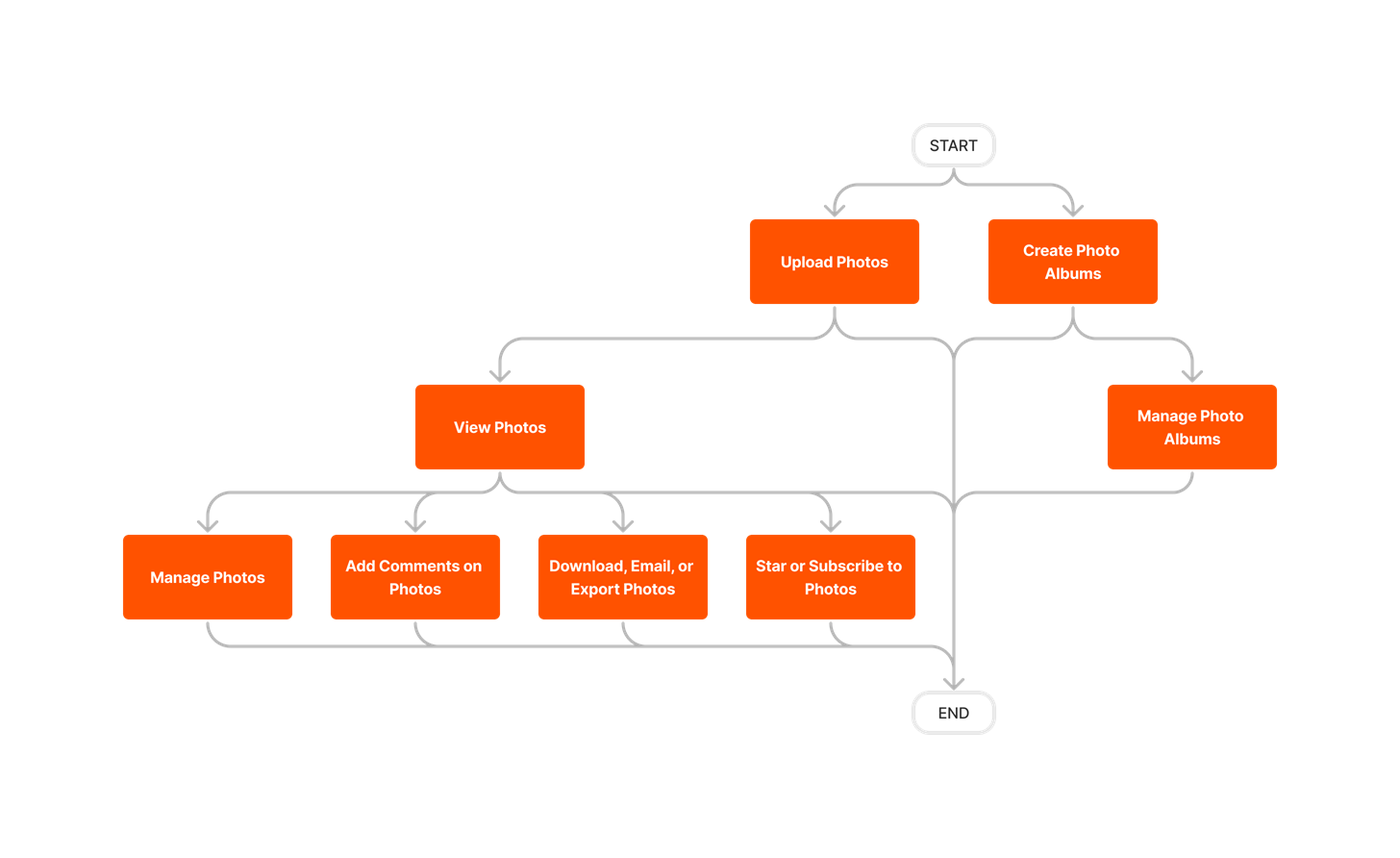
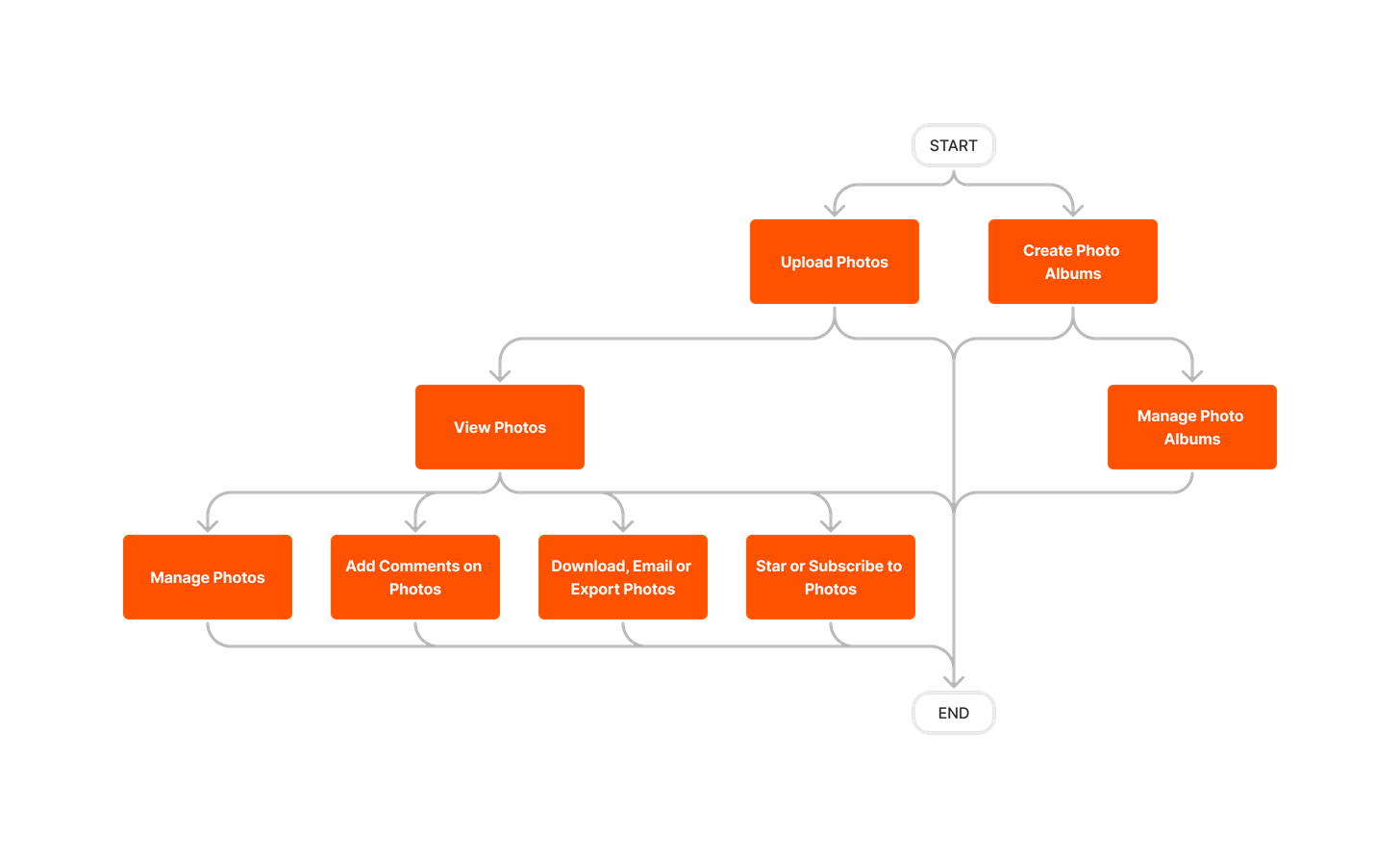
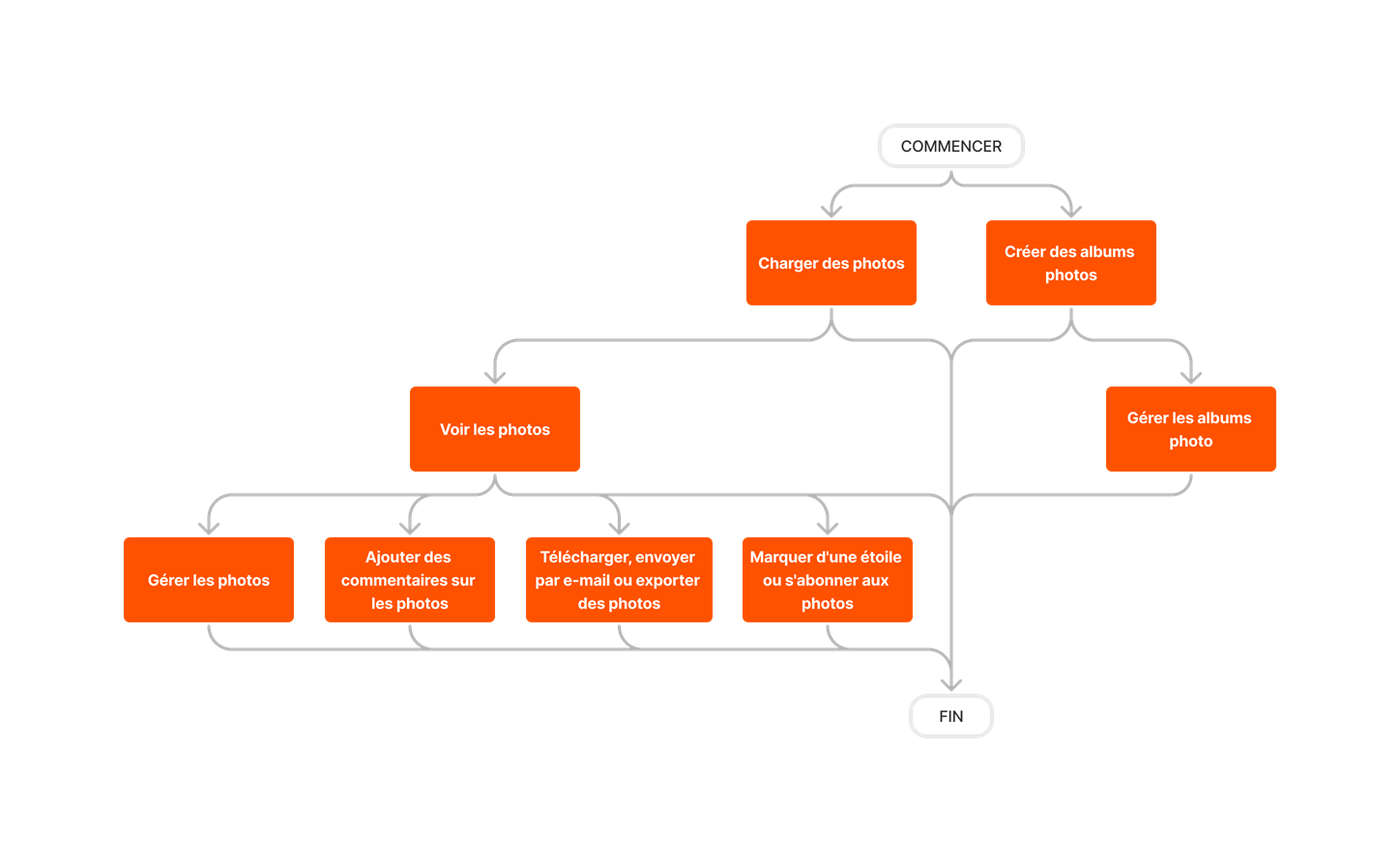
diagram_photos_tool-overview.png

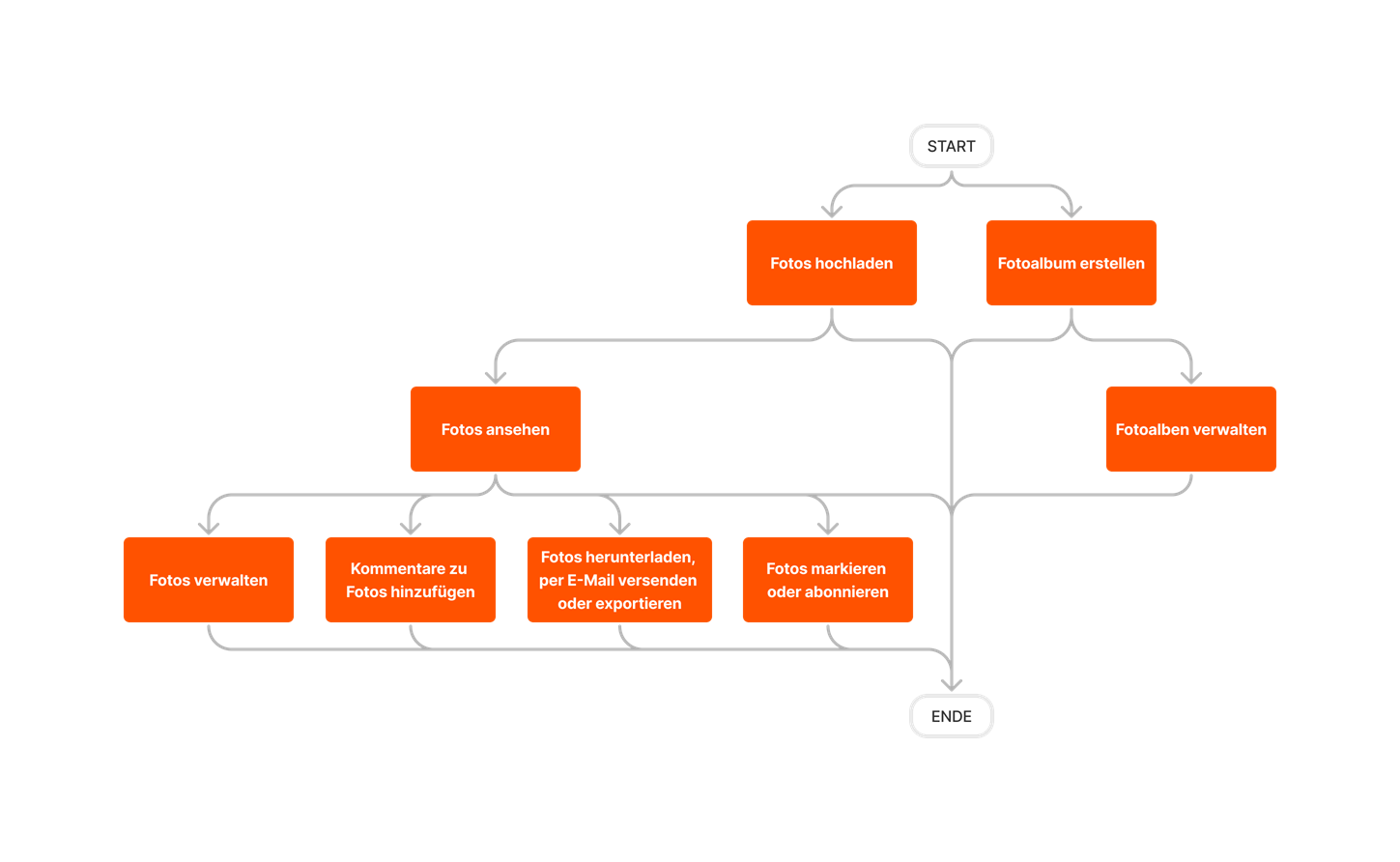
diagram_photos_tool-overview_de-de.png

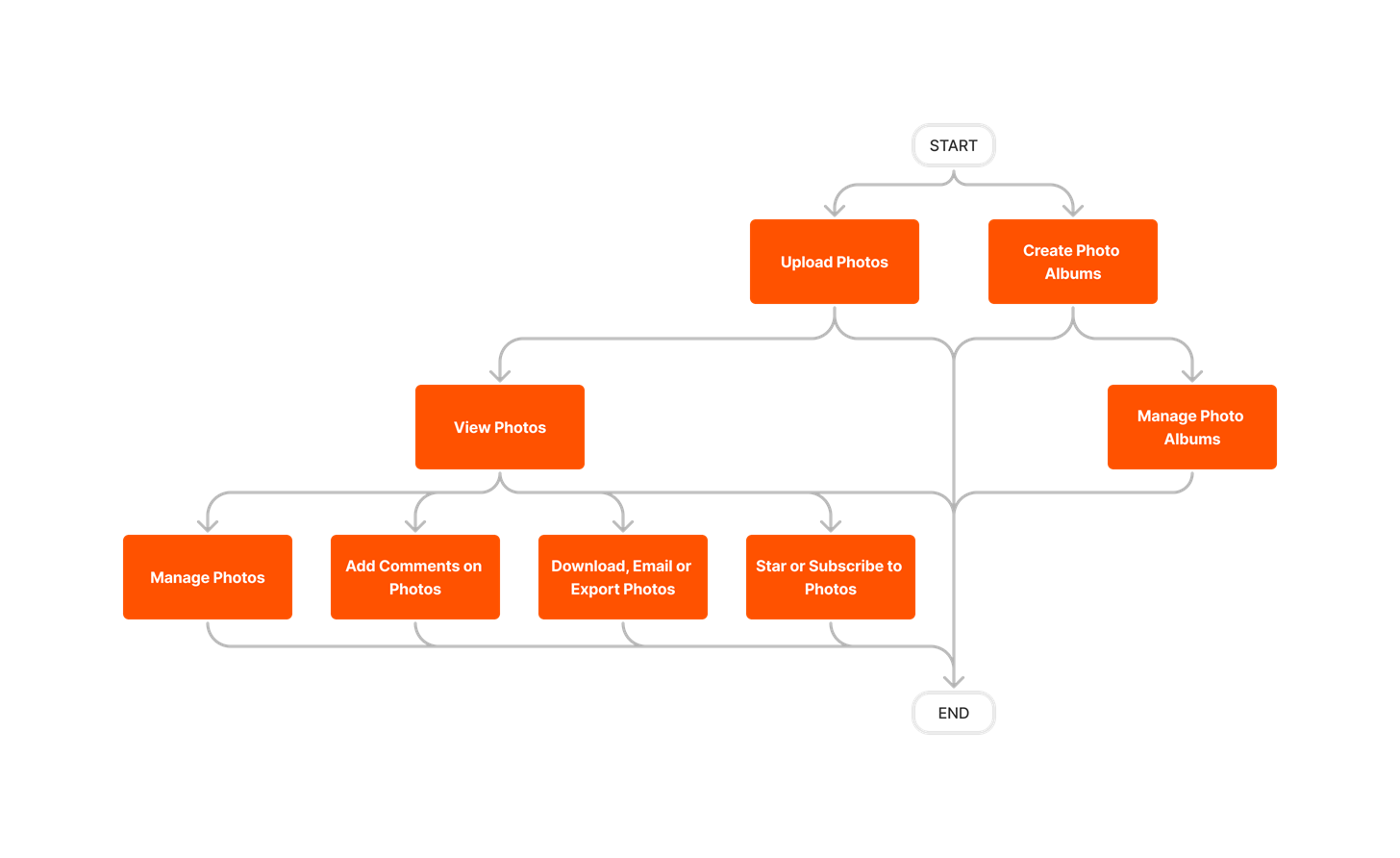
diagram_photos_tool-overview_en-au.png

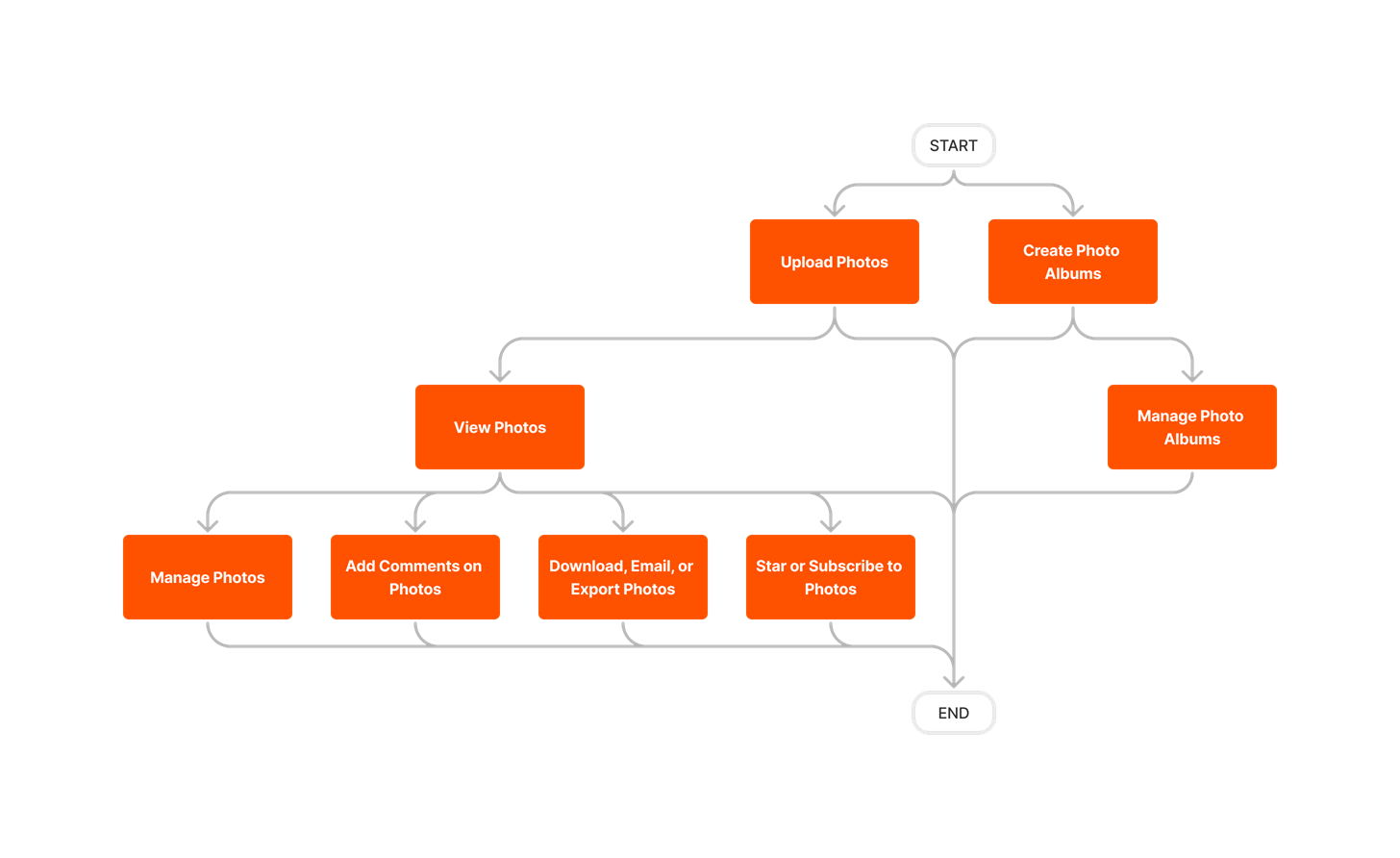
diagram_photos_tool-overview_en-ca.png

diagram_photos_tool-overview_en-gb.png

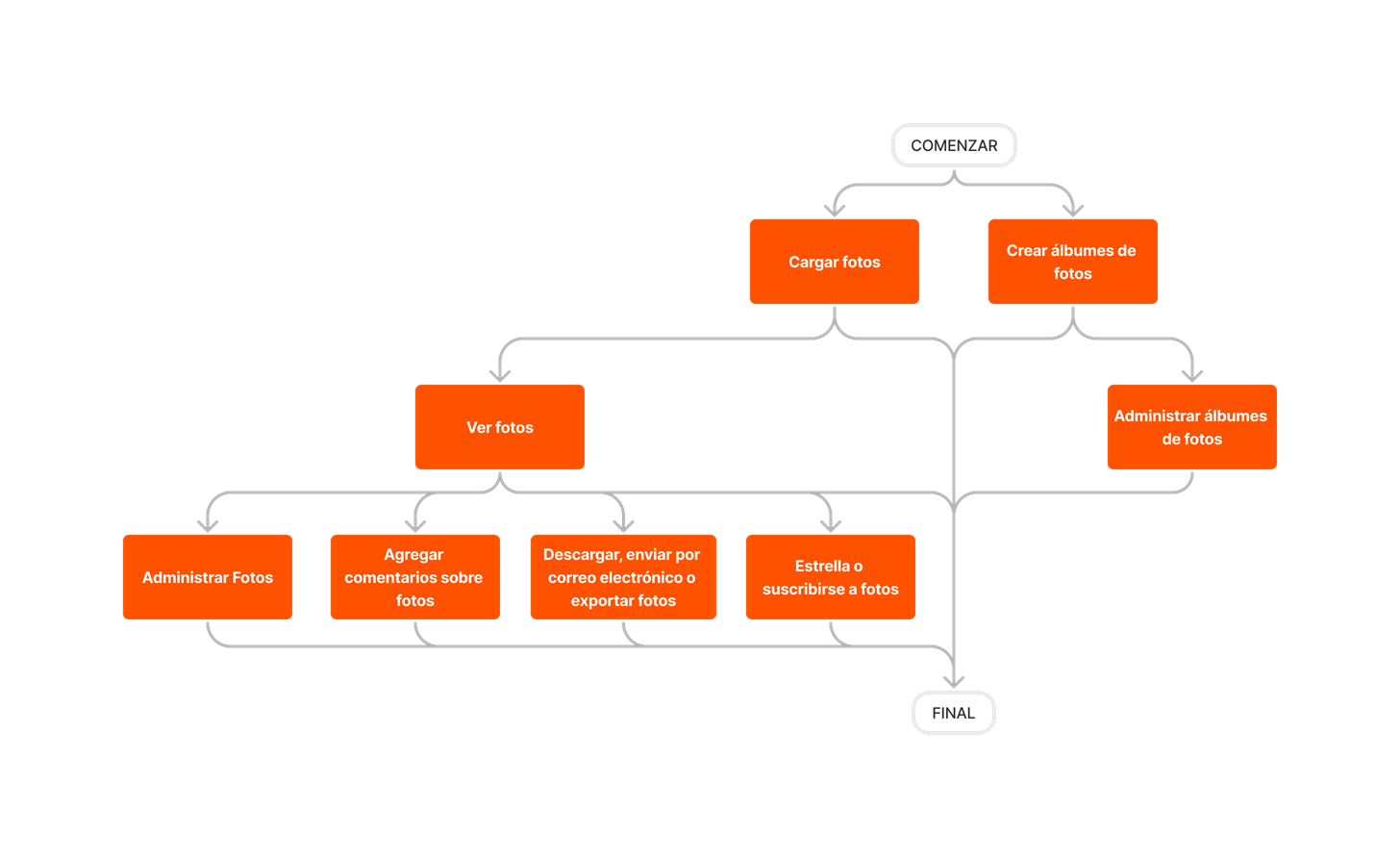
diagram_photos_tool-overview_es-es.png

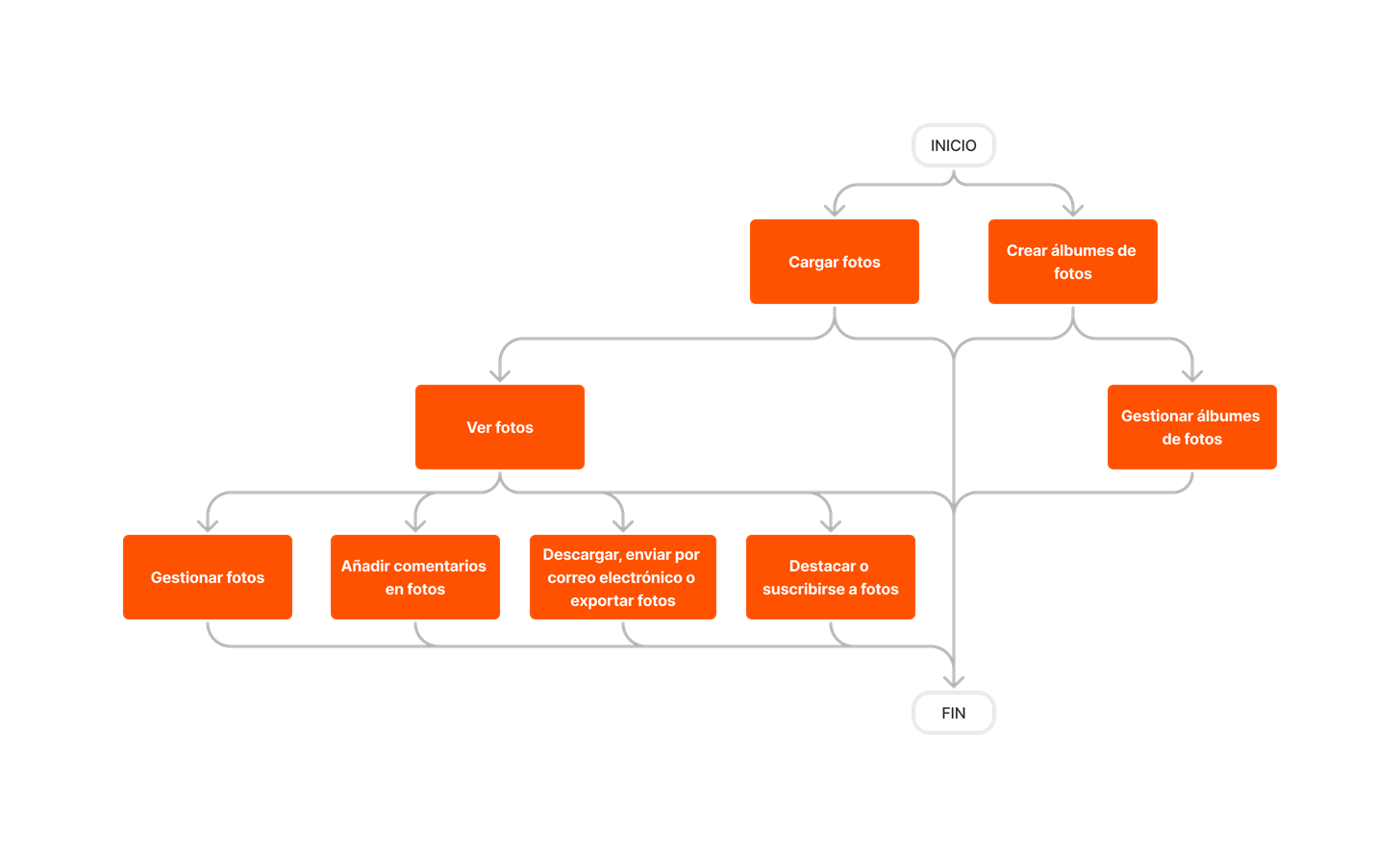
diagram_photos_tool-overview_es-la.png

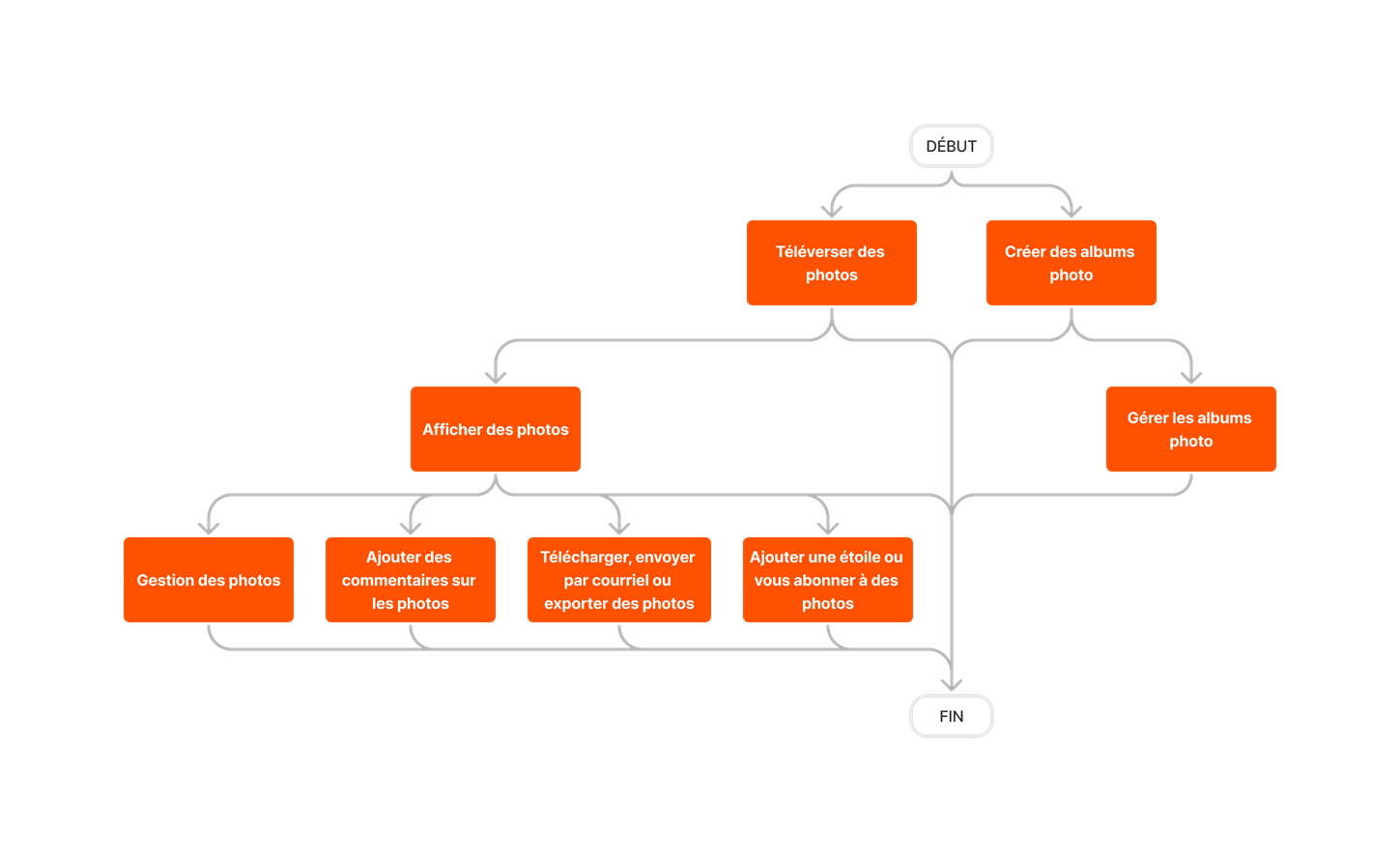
diagram_photos_tool-overview_fr-ca.png

diagram_photos_tool-overview_fr-fr.png

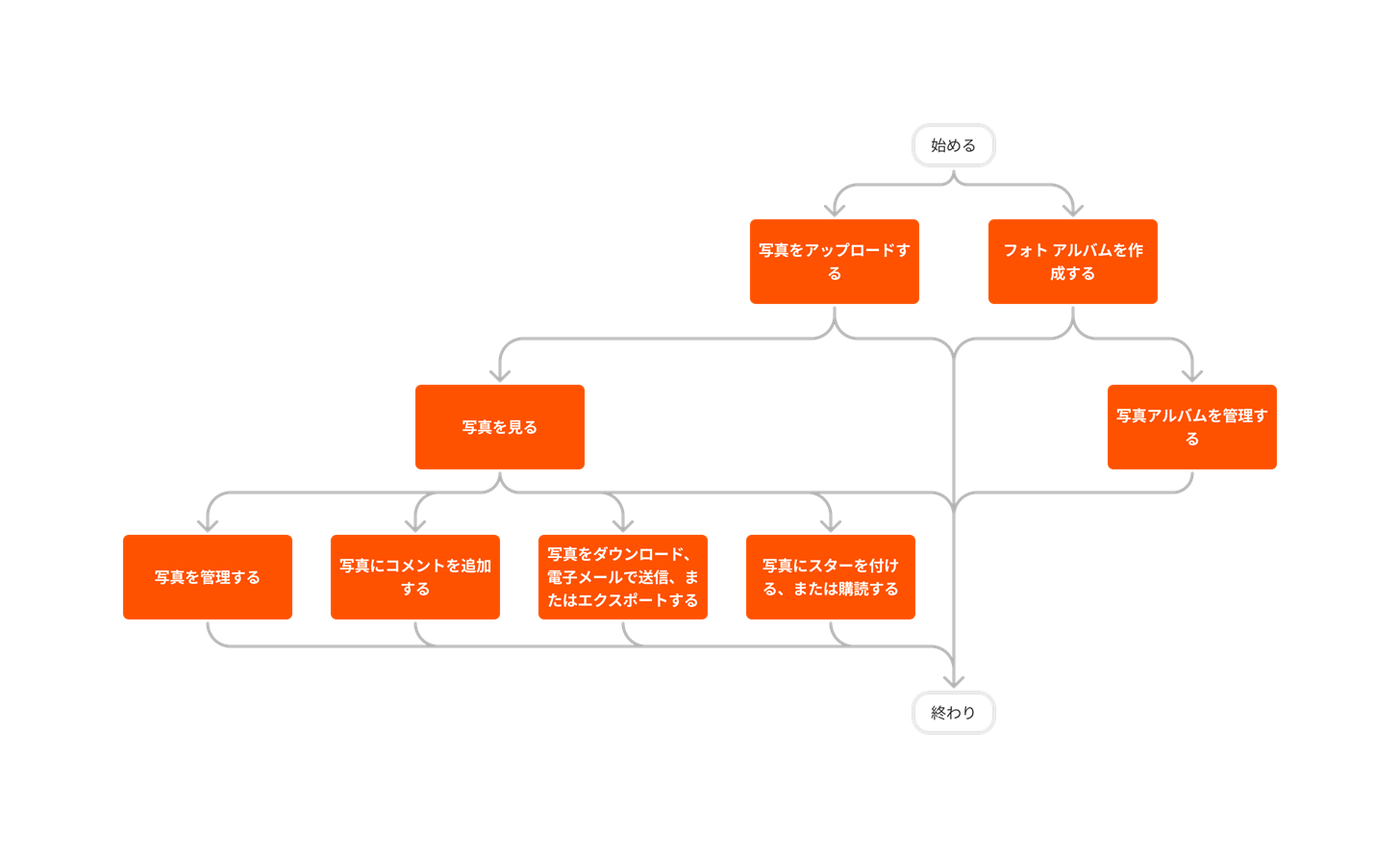
diagram_photos_tool-overview_ja-jp.png

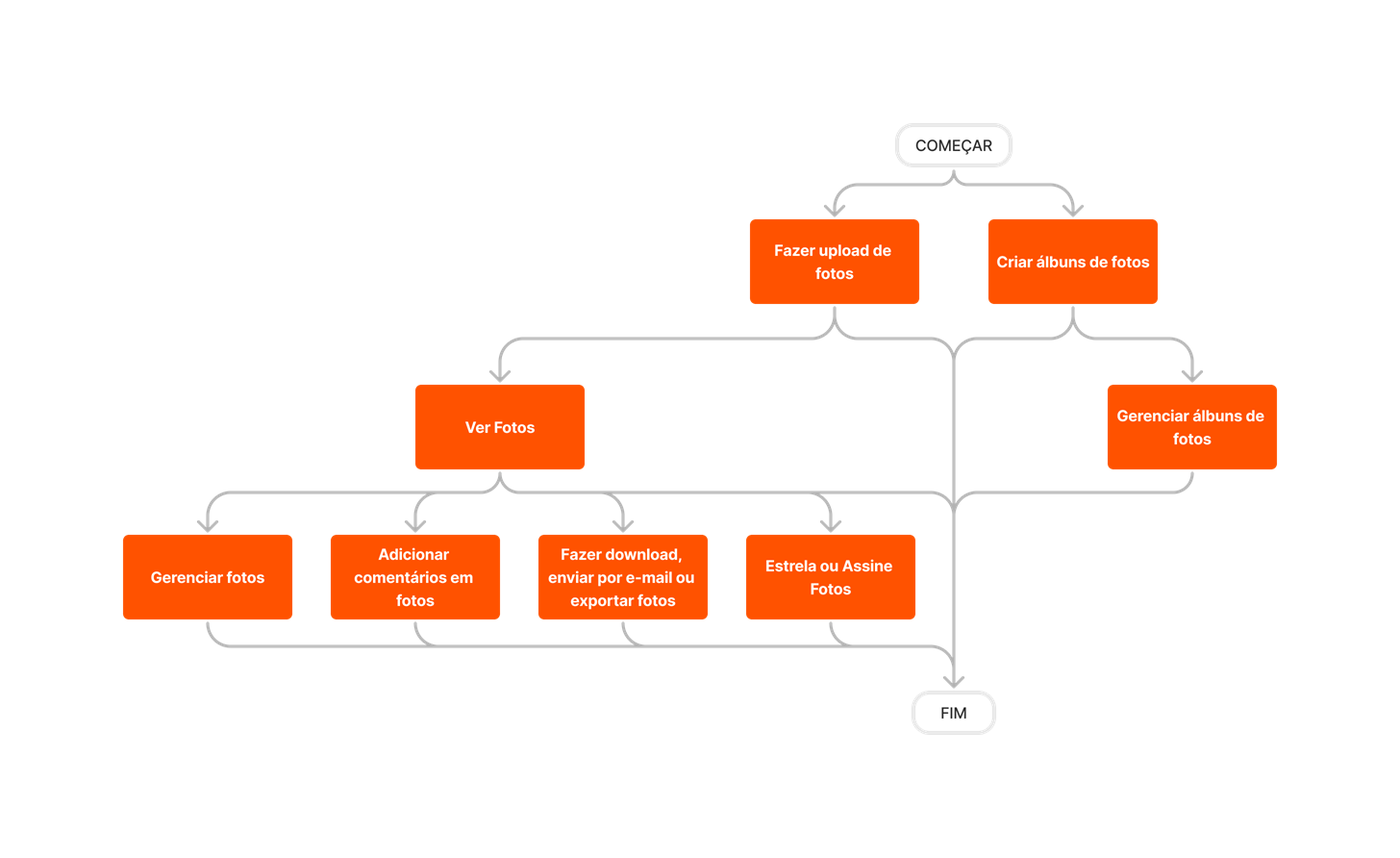
diagram_photos_tool-overview_pt-br.png

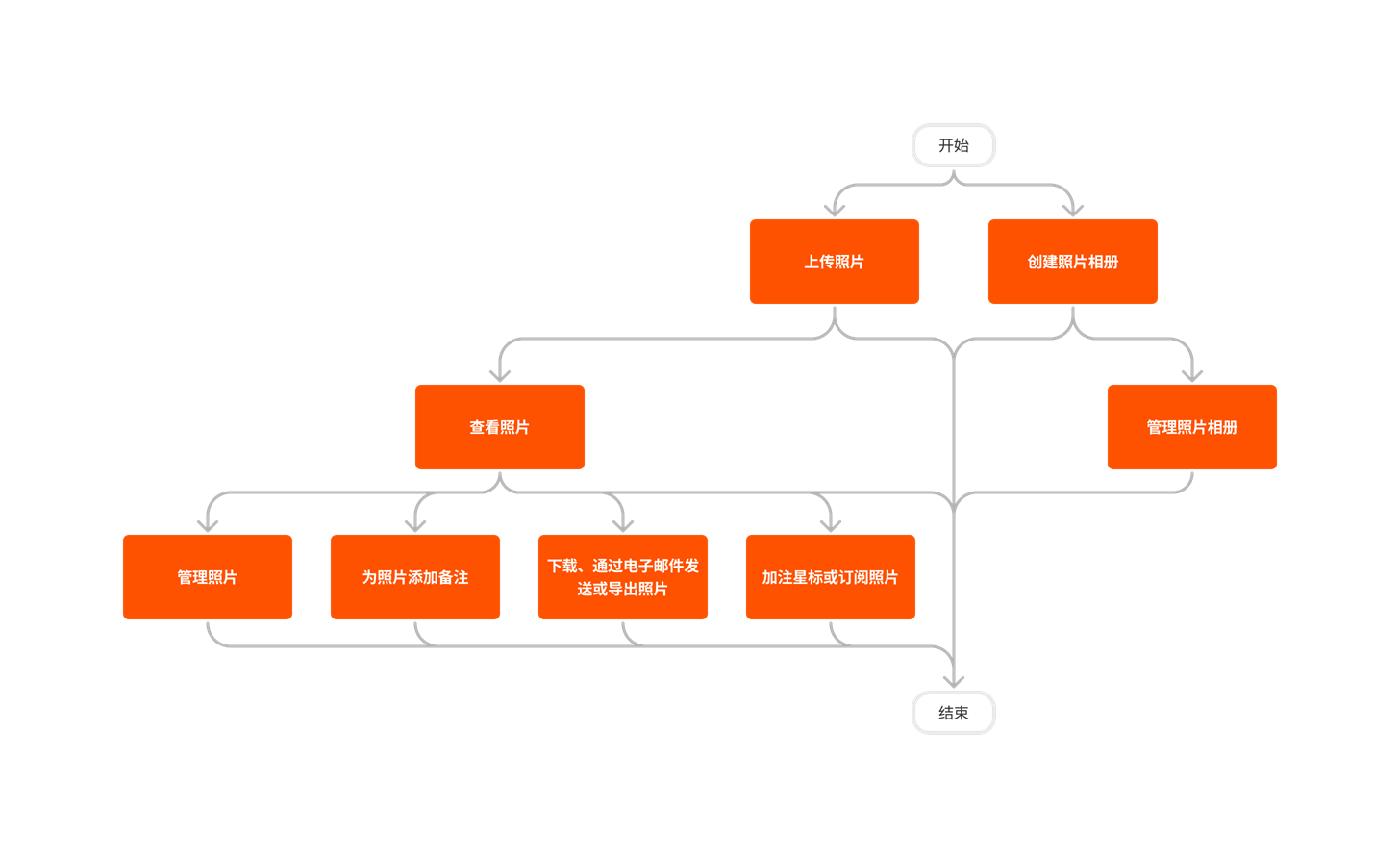
diagram_photos_tool-overview_zh-sg.png

diagram_photos_tool-overview.png

照片

下表突出显示了执行所述用户操作所需的用户权限。

icon-mindtouch-table-mobile.png :表示 Procore 的 iOS 和/或 Android 应用程序支持的操作。

icon-mindtouch-table-check.png+ : Indicates that one or more granular permissions are available for the task. See the relevant tutorial or Grant Granular Permissions in a Project Permissions Template for more information.

任务 只读 标准 管理员
向照片添加备注icon-mindtouch-table-mobile.png     icon-mindtouch-table-check.png icon-mindtouch-table-check.png
为照片添加描述icon-mindtouch-table-mobile.png     icon-mindtouch-table-check.png icon-mindtouch-table-check.png
使用助手分析照片   icon-mindtouch-table-check.png icon-mindtouch-table-check.png icon-mindtouch-table-check.png
批量编辑照片     icon-mindtouch-table-check.png 1 icon-mindtouch-table-check.png
配置高级设置:照片       icon-mindtouch-table-check.png
创建照片相册icon-mindtouch-table-mobile.png   icon-mindtouch-table-check.png + icon-mindtouch-table-check.png icon-mindtouch-table-check.png
删除照片相册   icon-mindtouch-table-check.png + icon-mindtouch-table-check.png + icon-mindtouch-table-check.png
删除照片icon-mindtouch-table-mobile.png       icon-mindtouch-table-check.png
下载照片icon-mindtouch-table-mobile.png   icon-mindtouch-table-check.png icon-mindtouch-table-check.png icon-mindtouch-table-check.png
通过电子邮件发送照片(入站) icon-mindtouch-table-check.png icon-mindtouch-table-check.png icon-mindtouch-table-check.png icon-mindtouch-table-check.png
通过电子邮件发送照片(出站) icon-mindtouch-table-mobile.png     icon-mindtouch-table-check.png icon-mindtouch-table-check.png
将照片导出为 PDF   icon-mindtouch-table-check.png icon-mindtouch-table-check.png icon-mindtouch-table-check.png
查找已加星标(已收藏)的照片       icon-mindtouch-table-check.png
将照片标记为私密       icon-mindtouch-table-check.png
将相册标记为私密       icon-mindtouch-table-check.png
移动照片       icon-mindtouch-table-check.png
重命名相册icon-mindtouch-table-mobile.png       icon-mindtouch-table-check.png
重新排列照片相册   icon-mindtouch-table-check.png + icon-mindtouch-table-check.png + icon-mindtouch-table-check.png
从回收站中恢复照片       icon-mindtouch-table-check.png
旋转照片       icon-mindtouch-table-check.png
搜索并筛选照片icon-mindtouch-table-mobile.png   icon-mindtouch-table-check.png icon-mindtouch-table-check.png icon-mindtouch-table-check.png
设置项目照片       icon-mindtouch-table-check.png
设置照片地点     icon-mindtouch-table-check.png icon-mindtouch-table-check.png
为照片添加星标       icon-mindtouch-table-check.png
订阅照片   icon-mindtouch-table-check.png icon-mindtouch-table-check.png icon-mindtouch-table-check.png
上传照片icon-mindtouch-table-mobile.png     icon-mindtouch-table-check.png icon-mindtouch-table-check.png
查看照片icon-mindtouch-table-mobile.png   icon-mindtouch-table-check.png icon-mindtouch-table-check.png icon-mindtouch-table-check.png
查看私密照片icon-mindtouch-table-mobile.png   icon-mindtouch-table-check.png + icon-mindtouch-table-check.png + icon-mindtouch-table-check.png 

1 具有项目照片工具“标准”级别权限的用户仅能批量编辑照片描述。


以下列示对项目照片工具进行的重大更改。

最近更改

电子邮件现代化(2026 年 3 月 17 日)

Procore 使与照片工具相关的电子邮件通知实现了现代化。此更新适用于所有地区的网页版、iOS 版和 Android 版用户。所有与照片工具相关的电子邮件现在都遵循一致的新设计系统,即通知用户以下事件 - User 在照片备注中提及、新照片上传和通过电子邮件共享照片。项目团队可以快速了解发生了什么,执行明确的号召性用语,并直接跳转到 Procore 的相关区域以跟进或继续他们的工作。更新后的电子邮件布局更易于在所有设备上扫描和交互,从而增强了可访问性。请参阅为什么我会收到行动导向的照片电子邮件?了解更多信息。

为移动应用程序中的照片启用即时地点戳(2026 年 2 月 10 日)

你现在可以使用移动应用程序相机(iOS 和 Android)中的"图章"菜单立即在照片上标记当前地点。当前设置的地点会自动添加到在应用程序内拍摄的任何照片。此地点图章功能可确保在应用程序中拍摄的每张照片都包含精确的地点详细信息,支持可跟踪性和报告要求。

以前,你可以手动导出照片并使用第三方工具来添加地点标签。此解决方法会导致生产力显着下降。新的地点图章功能可简化流程,节省时间并减少错误。包括业主和城市实体在内的项目利益相关方现在可以减少他们花在报告上的时间。请参阅使用当前地点为照片戳记(iOS)使用当前地点为照片戳记(Android)

支持在移动应用程序上查看 360° 照片(2025 年 11 月 19 日)

Procore 已向 Procore 移动应用程序(iOS 和 Android)中的照片工具添加了一个本机交互式 360 度图像查看器。照片工具现在支持无缝、全屏 360 度图像查看体验。现场团队可在不离开应用程序的情况下查看、平移和缩放高分辨率 360 度图像。360 度图像查看器无需切换到第三方应用程序并节省时间。它还简化了工作流并提高了现场效率。请参阅查看照片(iOS )和查看照片(Android)

注意:目前,360 度图像视图仅支持移动应用程序上的新照片(截至 2025 年 11 月)。

使用助手分析照片(2025 年 10 月 23 日)

Procore 在照片工具中引入了 使用助手分析照片 功能,允许用户选择多张照片并生成 AI 驱动的摘要。“使用助手进行分析”功能使团队能够快速汇总作业现场图像中的进度和安全见解,帮助利益相关者随时了解情况并主动管理风险。

现代化的照片:重新设计的设置(2025 年 10 月 7 日)

“照片设置”页面经过重新设计,与 Procore 的现代化用户体验保持一致,带来更直观的感觉。这些设置分为清晰的类别,以便更无缝地了解照片设置。请参阅配置高级设置:照片

照片地图 - 正式发布(2025 年 1 月 8 日)

Procore Maps 使用户能够在地图上查看照片和其他工具项,按位置查询它们,并跨各种工具链接到项。Procore Maps 通过提供与其他 Procore 功能无缝集成的综合可视化工具来增强项目执行,从而促进更好地规划、执行和监控建设工程项目。 请参阅 Procore 地图