

设置或返还分包商发票的保留金(旧版)
旧版内容
此页面详细介绍了分包商发票旧版体验。对于参与分包商发票测试版计划的客户,请参阅设置或返还分包商发票的保留金。
背景
需要考虑的事项
- 所需用户权限:
- 要在当前结算期之前、期间或之后编辑发票时设置和返还保留金,需要项目合约工具的“管理员”级别权限。
- 要仅在当前结算期内编辑发票时返还保留金,需要项目合约工具的“标准”级别权限,并且你必须是合同中指定的“发票联系人”。发票联系人会自动添加到合同的“私密”下拉列表中。
注意
要了解有关返还分包商发票的保留金的更多信息,请参阅为返还保留金创建分包商发票。
- 其他信息:
- 要为发票中的所有明细项设置相同的保留金百分比,请输入一个值以应用于发票中的所有明细项。
- 要返还所有明细项的保留金,请输入一个值以应用于所有明细项。 这会将所需的百分比从“当前已保留”列移动到“本期已返还”列。
- 你还可以使用 Procore 的浮动保留金功能管理预扣金额。请参阅什么是浮动保留金?
先决条件
- 启用采购订单或分包合同的保留金
- 创建一个新发票并将其置于"草稿"状态。请参阅代表发票联系人创建发票。
步骤
- 导航到项目的合约工具。
- 在合同标签页下,找到采购订单或分包合同。 然后点击编辑。
- 点击发票标签页。
- 找到要处理的分包商发票。
- 点击详细信息标签页。
- 点击编辑按钮。
- 选择后续步骤:
设置所有明细项的保留金
要设置保留金,必须具有项目合约工具的“管理员”级别权限。
- 在设置所有明细项的保留金下,执行以下操作:
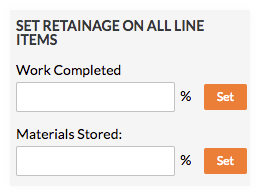
- 在已完成的工程框中输入要扣留的百分比。
- 点击设置。
- 在库存材料框中输入要扣留的百分比。要了解更多信息,请参阅如何为 Procore 中的库存材料开具账单? (旧版)
- 点击设置。
返还所有明细项的保留金
- 如需返还发票的保留金,则必须具有上面详述的所需用户权限。
- 要了解如何新建分包商发票以返还所有明细项的保留金,请参阅创建分包商发票以返还保留金。
- 在返还所有明细项的保留金下,执行以下操作:
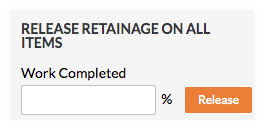
- 在已完成的工程框中输入要返还的百分比。
- 点击返还。
会出现绿色横幅,确认保留金已返还。
If you would like to learn more about Procore's commitments software and how it can help your business, please visit our construction financials tool product page  .
.
.