创建送审
目标
使用项目送审工具为项目创建送审。
背景
在建筑行业,送审材料是指分包商向总承包商提供的书面和/或物理信息。然后在将设备、材料等制造并交付给项目之前,需要将这些信息提交给设计团队进行审批。送审材料可以采用各种格式,例如施工图纸、设备分页图和材料样品。建筑师和工程师之所以需要送审材料,主要是为了验证是否按照设计文件/合同文件的规定在项目中安装正确的产品和数量。
尽管每个公司和项目都可能有其特定的流程,但项目经理或工程师通常会担任送审 经理。 首先,送审 经理将创建送审。 接下来,分包商提供送审所需的文档。 然后,所需的文件准备就绪后,送审将发送给相应的设计团队成员以供审核和批准。
需要考虑的事项
- 所需用户权限:
- 要创建送审:
- 送审工具的“只读”或“标准”级别权限,并在权限模板上启用“创建送审”细分权限。
或者 - 项目送审工具的“标准”级别权限,没有分配给你的权限模板。
或者 - 项目送审工具的“管理员”级别权限。
- 如果没有项目送审工具的“管理员”级别权限,你只能将项目送审工具上具有“管理员”级别权限的用户添加到送审工作流。
- 有项目送审工具上的“管理员”级别权限,你可以将项目送审工具上具有“标准”级别或更高级别权限的任何用户添加到送审工作流中。
- 送审工具的“只读”或“标准”级别权限,并在权限模板上启用“创建送审”细分权限。
- 要创建送审:
- 配置设置:
- 新项目开始时,对送审工具拥有“管理员”级别权限的用户通常会为项目送审工具配置以下设置:
- 成本编号。成本编号在 Procore 工作分解结构的“成本编号”细分进行管理。
- 默认送审经理。请参阅为送审工具指定“默认送审经理”
- 分发。请参阅将通讯组添加到项目目录。
- 编号。请参阅Procore 中的送审文件如何编号?
- 进度计划计算。请参阅计算送审进度计划信息(如果已启用)
- 进度计划任务。如果进度计划工具在项目中处于活动状态,则可以将送审与项目进度计划中的任务关联。请参阅进度计划。
- 规范分项。 你的项目可能设置为使用项目规范工具或项目管理员工具。 请参阅送审工具中"规范分项"下拉列表中的选项从何而来?
- 送审工作流模板。项目可能设置为使用送审工作流模板。请参阅管理送审工作流模板。
- 新项目开始时,对送审工具拥有“管理员”级别权限的用户通常会为项目送审工具配置以下设置:
- 其他信息:
- 为项目添加送审的替代方法包括:
- 将你的送审导入项目级别送审工具。请参阅将已完成的送审导入模板发送到 Procore。
- 从项目级别规范工具生成送审 日志。 请参阅送审生成器:从规范生成送审材料。
- 为项目添加送审的替代方法包括:
视频
步骤
- 导航到项目送审工具。
- 点击“+创建”>“送审”。
- 按如下所示新建送审:
添加一般信息
注意
对送审工具具有标准权限的用户在创建新送审时只能查看以下字段:
标题、规范分项、编号和修订、送审类型、责任承包商、接收自、最终截止日期、地点、关联图纸、通讯名单、后续行动者、私密、描述、附件
- 在一般标签页中完成数据输入,如下所示:
注意事项:
如果送审是未完成且没有工作流,则后续行动者是送审经理,该项应显示在他们的"我的未完成项"工具中。
如果送审为未完成并且确实有工作流,则当前工作流步骤任务任务分配 对象有后续行动者。工作流完成后,BIC 将返回给送审经理。
如果送审为已关闭,则后续行动者将被清除。
-
注意事项:
当达到"最终截止日期"时,系统会发送自动电子邮件通知,通知用户送审已逾期。如果你的系统配置为使用依序 审批,则通知会发送给审批工作流中的送审经理和后续行动者。如果你的系统配置为使用平行 审批,则通知会发送给送审经理和审批工作流的成员。
计算送审进度计划信息(如果启用)
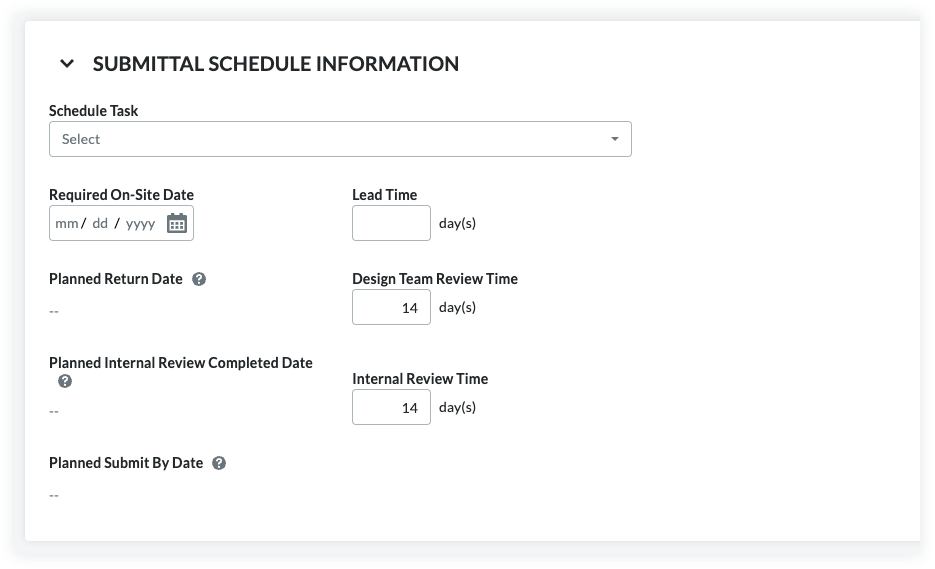
送审进度计划计算是可以启用的可选功能。请参阅启用送审进度计划计算。启用后,送审工具将分析“物料要求送抵现场日”、“前置时间”、“设计团队审核时间”和“内部审核时间”字段中的条目,为送审者和审批者提供有关送审工作流“截止日期”的建议。还会自动填充“计划返回日期”、“计划内部审核完成日期”和“计划提交截止日期”字段。
- Follow the steps in Create a Submittal.
This reveals the New Submittal page. - Scroll down to the Submittal Schedule Information area.
- Set the following information:
- Schedule Task. The schedule task associated with the submittal being created. A schedule must be uploaded to the project first. See Upload a Project Schedule File to Procore's Web Application.
- Note: If you enter 7, the system subtracts '7' calendar days from the Planned Return Date to automatically populate the date entry for the Planned Internal Review Completed Date.
- Note: If you enter 10, the system subtracts '10' calendar days from the Required On-Site Date to automatically populate the date entry for the Planned Return Date.
-
Note: If you enter 5, the system subtracts '5' calendar days from the Planned Internal Review Completed Date to automatically populate the date entry for the Planned Submit by Date.
This illustration shows you an example of these entries and calculations.
更新交付信息
- 预计交付日期
查看“预期交付日期”中显示的日期。这是“前置时间”和送审分配之间的日期,它不会在提交送审时填充。提交送审后,该日期由 Procore 计算。请参阅分发送审。 - 进度计划任务
如果你在项目上启用了进度计划工具并将Asta Powerproject 、 Microsoft Project或Oracle Primavera进度计划与 Procore 集成,则当你有具有的用户账户时,你可以从进度计划任务下拉列表中选择项目任务被授予进度计划工具的"只读"或更高级别权限。 仅供参考。 - 确认交货日期
选择分包商或供应商使用确认交货日期日历确认货物到达的日期。 - 实际交付日期
使用“实际交付日期”日历选择材料到达现场的日期。通常,该值由项目监理更新。
应用送审工作流模板
拥有项目送审工具“管理员”级别权限的用户可以创建一 (1) 个或多个送审流程模板,然后可以在首次创建时将其添加到新送审中。这可以防止每次创建送审时都必须添加新的送审工作流,从而节省了数据输入时间。
- 在送审工作流下,执行以下作:
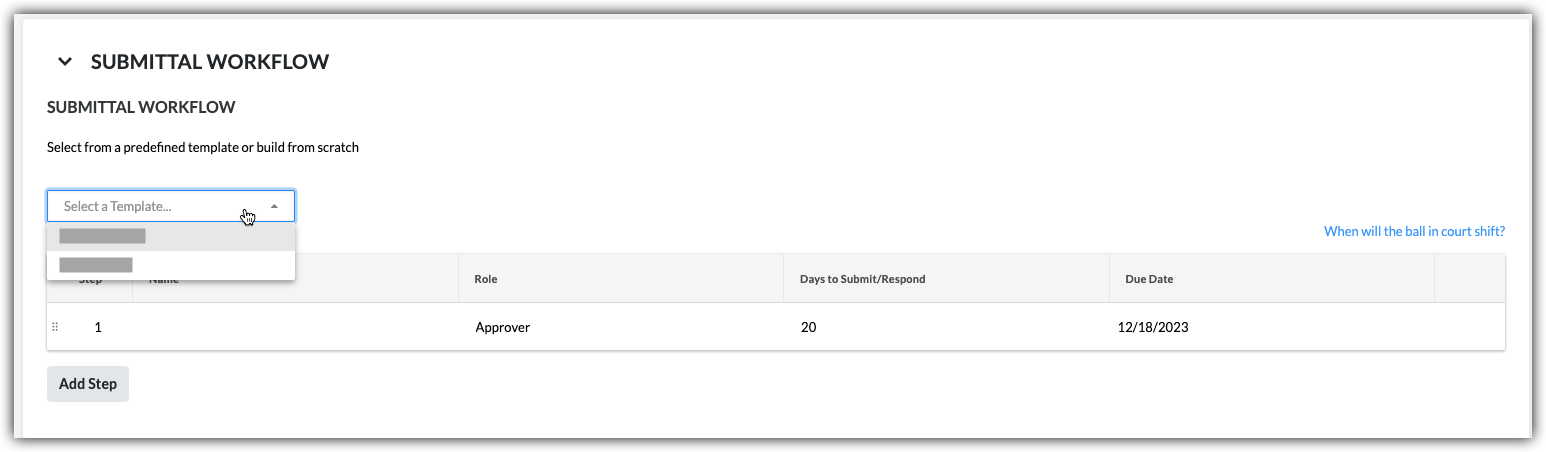
- 选择模板。从下拉列表中选择工作流模板。
注意:- 此下拉列表仅对拥有送审工具“管理员”级别权限的用户可见和可用。
- 此操作将送审工作流模板中指定的人员应用于你的送审。
- 要了解如何创建送审工作流模板,请参阅管理送审工作流模板。
- 选择模板。从下拉列表中选择工作流模板。
- 继续根据送审需要修改名称、角色和提交/答复的时限字段。变更仅影响送审工作流,但不会影响送审工作流模板。
- (可选)继续执行将用户添加到送审工作流中的步骤。
将用户添加到送审工作流
- 在送审工作流下,对送审中的每个所需明细项执行以下操作:
- 姓名。开始在搜索框中输入项目用户名称。然后从列表中选择适当用户。
- 如果想要求用户答复,请勾选其姓名旁边的复选框。
或者 - 如果不想要求用户答复,请清除对勾。
注意:如果将多个用户添加到平行审批工作流组,则当组中标记为必需的所有人员提交送审答复后,后续行动者职责将转移到下一个工作流组。
- 如果想要求用户答复,请勾选其姓名旁边的复选框。
- 角色。从列表中选择审批者或送审者。请参阅送审中的送审者和审批者有什么区别?
注意:- 要被指定为审批者,此人必须位于项目级别目录工具中(请参阅将用户账户添加到项目目录),并且还必须被授予对送审工具的"管理员"或"标准"级别权限(请参阅设置用户账户送审工具的权限)。
- 如果是对送审工具具有“标准”级别权限的用户,则只能将具有“管理员”级别权限的用户添加到工作流中。
- 如果计划在送审中添加送审者,我们建议指定送审经理作为送审依序审批工作流的第一审批者。因此送审经理有机会确保在将送审发送给送审工作流的下一步用户之前,能由内部利益相关方彻底审查送审。
- 如果你是对送审工具具有“管理员”级别权限的用户,则可以将具有“管理员”或“标准”级别权限的用户添加到工作流。
注意:如果希望送审工作流使用依序审批,请仅向工作流中的每个明细项添加一个用户。如果希望送审工作流中的某个步骤使用平行审批,请将两个或更多用户添加到明细项。
- 截止日期。从日历中选择送审答复的截止日期。
注意:“截止日期”字段将根据送审工具“配置设置”页面上指定的默认天数自动填充。请参阅配置设置:送审工具。截止日期还考虑了哪些天被设置为项目“工作日”。请参阅设置项目工作日。
- 姓名。开始在搜索框中输入项目用户名称。然后从列表中选择适当用户。
- 点击添加步骤。
- 重复这些步骤以将另一个用户添加到工作流。
- 如果要更改工作流步骤的顺序,请执行以下操作:
- 按住竖屏(\\)抓取明细项。
- 使用拖放操作将明细项移动到所需顺序。

更新并发送送审以供审核
完成上述步骤后,选择以下选项之一:
- 要保存变更而不向送审工作流的成员、通讯名单成员和送审经理发送电子邮件,请点击创建。
或者 - 要保存变更并发送电子邮件通知以提醒送审工作流成员和通讯名单成员,请点击创建并发送电子邮件。
 .
.