跳转到主内容
Procore

将传输记录日志导出为 CSV

目标

使用项目的传输记录工具将传输记录日志导出为 CSV。

需要考虑的事项

  • 所需用户权限:
    • 项目传输记录工具的“只读”或更高级别权限。

先决条件

步骤

  1. 导航到项目的传输记录工具。
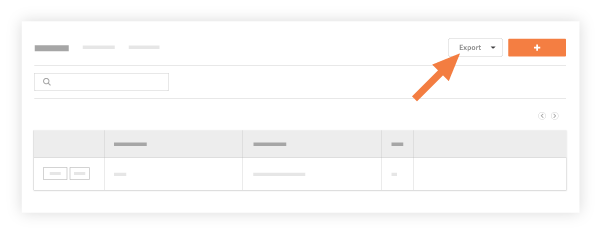
  2. 点击导出并选择CSV
    export1.png
    这会将传输记录日志的内容导出为CSV文件格式,并包括以下信息列:
    • (#) Number: Shows the transmittal number. 

    • Subject: A descriptive subject for the transmittal.

    • Actions(s) Requested: A list of any actions requested on the transmittal. 

    • Created Date: The date the transmittal was first created in the system. 

    • Sent Date: The date added to the 'Sent date' field under the 'Action As Noted' section of the transmittal.

    • To Company: The company (or companies) associated with the people on the transmittal. 

    • Attn: Shows the recipients (i.e., the 'To' and 'Cc' fields) on the transmittal. 


If you would like to learn more about Procore's transmittals management software and how it can help your business, please visit our construction transmittal software product page icon-external-link.png.