

删除预算内人工工时和预算内生产数量
目标
从“基于单位/数量的预算”页面删除预算内人工工时和预算内生产数量。
背景
如果要从“基于单位/数量的预算”页面删除预算内人工工时和预算内生产数量,则所使用的步骤取决于是否启用项目预算工具。
需要考虑的事项
- 所需用户权限
- 对于使用 Procore 项目财务管理且已启用“Procore 人工生产力成本”的客户,按下文所述删除预算内生产数量后,将反映在预算视图中。要了解预算视图,请参阅设置 Procore 人工生产力成本预算视图。
先决条件
- 如果启用预算工具,用户首先需要通过删除相应预算明细项来从预算中删除人工工时。有关详细信息,请参阅删除预算明细项。
步骤
如果禁用预算工具
- 导航到项目的管理员工具。
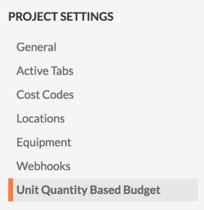
- 在"项目设置"下,点击基于单位数量的预算。
- 找到要删除的预算内人工工时和生产数量的明细项。
- 将鼠标悬停在明细项的最右侧以显示垃圾桶
 图标。
图标。 
- 点击垃圾桶图标。
- 在“删除人工工时和生产数量”窗口中点击删除人工工时、删除生产数量或同时删除。
如果启用预算工具
注意:只能从预算工具更新或删除人工工时。请参阅删除预算明细项。
- 导航到项目的管理员工具。
- 在“项目设置”下,点击 基于单位数量的预算。
- 找到要删除的预算内人工工时和生产数量的明细项。
- 将鼠标悬停在明细项的最右侧以显示 垃圾桶 图标。
- 点击 垃圾桶 图标。
- 在“删除人工工时和生产数量”窗口中点击删除生产数量。
另请参阅
If you would like to learn more about Procore's timesheet management software and how it can help your business, please visit our construction timesheet software product page  .
.
.