批准预算变更
目标
使用项目预算工具批准预算变更。
背景
如果你的 Procore 用户账户已被授予项目预算工具的用户权限,则你可以批准预算变更。要执行此操作,只需在预算变更页面更改其状态。
需要考虑的事项
- 所需用户权限:
- 项目预算工具的“管理员”级别权限。
或者 - 项目预算工具的"只读"或"标准"级别权限,并在你的权限模板上启用"创建、编辑和删除预算变更"细分权限。
- 项目预算工具的“管理员”级别权限。
- 其他信息:
- Procore 建议你的公司(或每个项目团队)制定相关政策,以便管理你环境中的预算变更。
- Procore 的公司级别工作流工具支持预算变更。
- 限制:
- For companies using the
 ERP Integrations tool: Show/Hide
- Only 'Approved' budget changes can be sent to Procore + ERP Integrations.
- Budget changes can be retrieved from Procore + ERP Integrations if they have not yet been synced.
- Budget changes cannot be edited or deleted once synced with the integrated ERP system.
先决条件
步骤
- 导航到项目的预算工具。
- 点击预算变更标签页。
- 找到要批准的预算变更。然后点击其预算变更编号链接。
- 在"一般信息"部分,点击编辑。
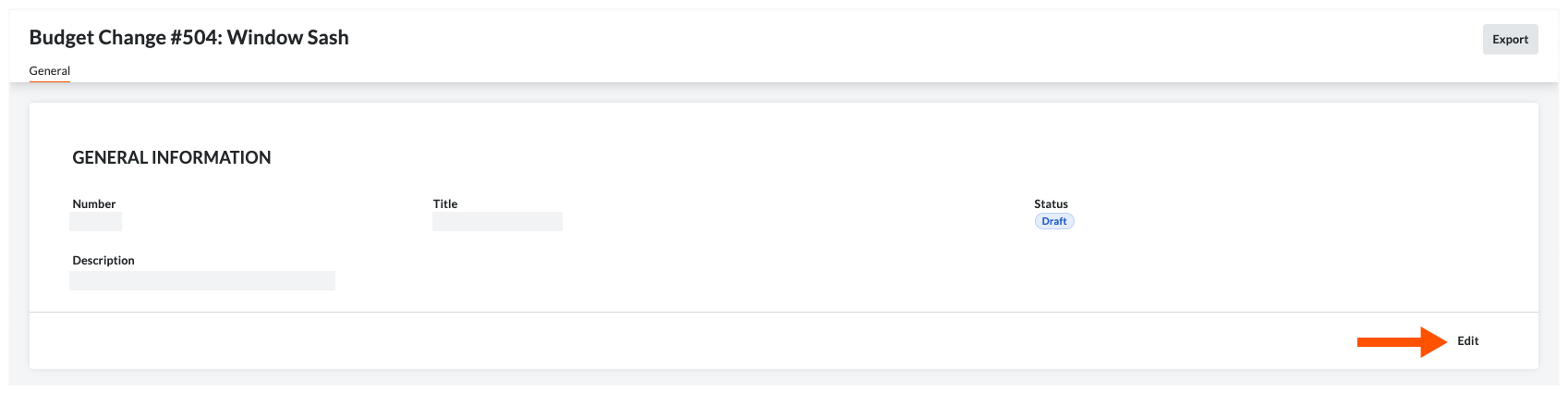
- 审核预算变更及其所有调整。
- 在"一般信息"区域,从状态下拉列表中选择"已批准"。
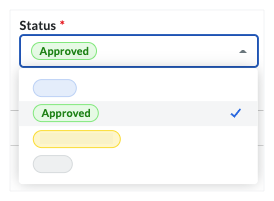
- 点击保存。
另请参阅
If you would like to learn more about Procore's budget management software and how it can help your business, please visit our construction budgeting software product page  .
.
.