将多层地点添加到项
目标
在项的创建或编辑页面内对项添加多层地点(例如送审、RFI、变更通知单等)。
背景
如果项目管理员已在项目中启用此功能,你或许能够“即时”添加多层地点。这意味着,在为项添加地点时,你将能够从项的编辑或创建页面新建地点以添加到项目地点主列表中。
需要考虑的事项
- 所需用户权限:
- 因工具和任务而异。检查用户权限矩阵,了解在支持工具上创建或编辑项所需的权限。
注意: 具有适当权限的用户还可以使用项目级别管理员工具添加地点。请参阅 将分层地点添加到项目。
- 因工具和任务而异。检查用户权限矩阵,了解在支持工具上创建或编辑项所需的权限。
- 支持的 Procore 工具:
- 其他信息:
- 即使你有权编辑或创建上述列表中的项,你的项目经理也可能已关闭动态添加新地点的功能。如果是这种情况,你在添加地点时将不会看到橙色的“添加新地点”按钮。
- 地点可以拥有几乎无限数量的层。
- 不允许出现重复的地点名称。
- 地点基于每个项目创建。
步骤
- 导航到其中一个受支持的工具。
注意: 有关支持创建新地点的工具列表,请参阅上面的 需要考虑的事项 。 - 点击要向其添加多层地点或要对该工具新建项的项旁边的编辑按钮。(注意:有关如何创建和编辑的指示,可通过在此页面顶部的搜索栏中搜索“创建 ____”或“编辑 ____”获取。)
- 选择“地点”旁边的下拉菜单。
- 使用提前输入的搜索栏查找要添加到项中的地点,或添加新地点。

添加新地点
你可以添加全新多层地点,也可以向现有多层地点添加新子地点。
添加新多层地点
- 输入你的第一层地点的名称。 (注意:请参阅什么是多层地点?第一层地点将是你的子地点的父地点,应该是最广泛的地点。 例如,在上图的列表中,我们可以添加"Floor 3"。)
- 如果已经存在第一层地点,则会提示你添加现有地点;如果该地点不存在,请点击 + 添加 [location name]。
- 输入第二层地点的名称。(注意:第二层地点将是第一层地点的子地点,应该指第一层内部的地点。例如,你可以为“3 楼”添加“301 室”)。
- 点击+添加[地点名称]绿色对勾。

- 根据需要为应用于项的地点添加尽可能多的子地点。(注意:建议遵循公司已设置的添加地点最佳实践。)
在此过程中的任何时候,你都可以通过将鼠标悬停在痕迹导航上并点击 X 删除该地点及其所有子地点,从而删除一个层及其所有子层。如果在打开此多层地点选择器之前,Procore 中已存在该地点或子地点,则不会将其永久删除。 - 将多层地点添加到项后,点击创建。(注意:该项会自动放置在项的“地点”字段中)。
- 点击页面底部的更新或创建,将地点保存到项目中。
向现有地点添加新层
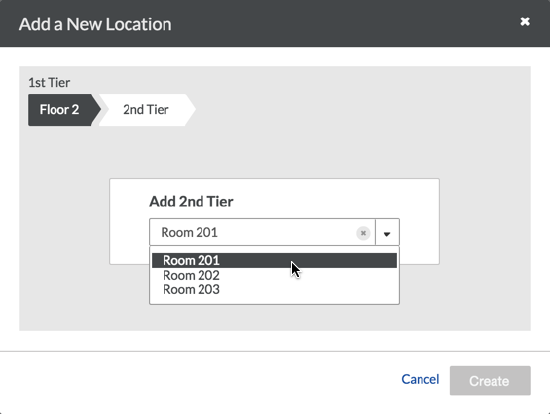
- 选择你要为其添加子地点的第一层地点,或使用提前输入菜单查找想为其添加子地点的第一层地点。
- 以类似的方式遵循地点层路径,直到到达要添加新子地点的层。
- 键入子地点名称。
- 点击 + 添加 [location name] 绿色对勾。
- 将多层地点添加到项后,点击创建。(注意:除非创建新子地点,否则无法选择“创建”按钮。点击“创建”后,新地点将自动放置在项的地点字段中)。
- 点击页面底部的更新或创建,将地点保存到项目中。