使用电子邮件工具回复电子邮件
目标
使用项目的电子邮件工具回复电子邮件。
背景
在项目的电子邮件工具中,你可以使用“全部回复”按钮来答复“电子邮件 - 收件箱”页面中的邮件。这会向原始邮件的所有收件人发送邮件。在撰写回复时你还可以选择添加其他收件人。
需要考虑的事项
- 所需用户权限:
- 项目电子邮件工具的“标准”或“管理员”权限
注意:拥有“标准”权限的用户只能查看和回复未标记为“私密”的邮件(请参阅将电子邮件消息标记为私密)。
- 项目电子邮件工具的“标准”或“管理员”权限
- 其他信息:
- 从电子邮件工具发送的电子邮件也可以从外部电子邮件客户端回复。请参阅回复从电子邮件工具发送的电子邮件。
步骤
- 导航到项目的电子邮件工具。
- 点击以突出显示所需的邮件,然后点击全部回复。
注意:只有在项目电子邮件工具中拥有"管理员"级别权限的用户才能看到设置为私密、存档和删除按钮。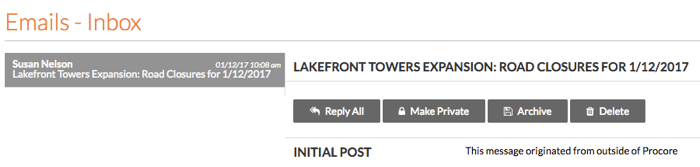
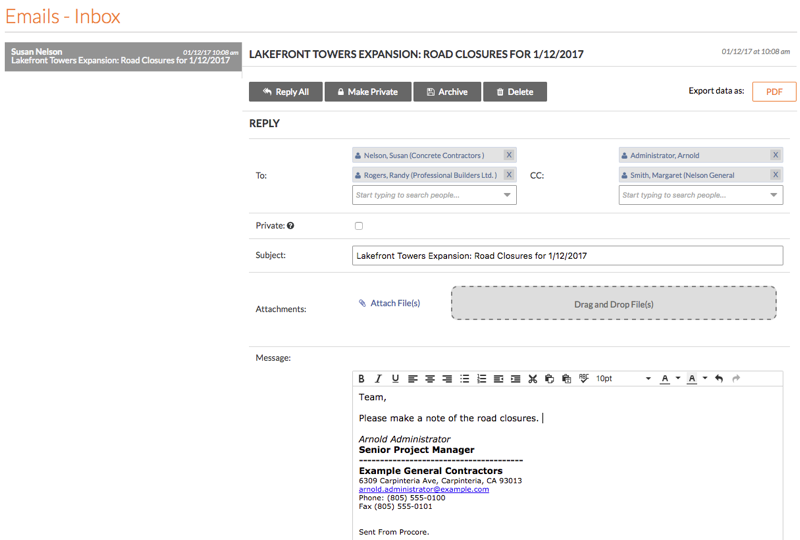
系统会显示回复表单。 - 完成以下数据输入:
- 滚动到页面底部。然后点击回复。
系统会将你的回复发送给指定的收件人。
If you would like to learn more about Procore's email management software and how it can help your business, please visit our construction email management software product page  .
.
.