目标
在 Procore iOS 应用程序中导航到不同的项目或公司。
需要考虑的事项
步骤
- 在 iOS 移动设备上打开 Procore 应用程序。
-
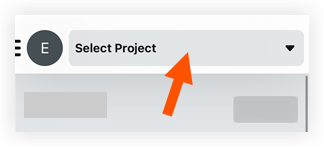
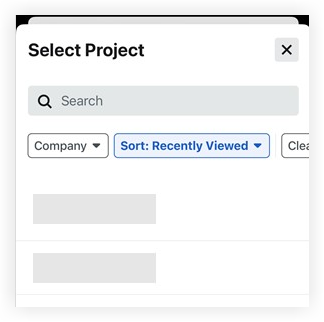
Tap the top menu to open the Project and Company Selector. Select a project from the search results or use one of these filtering methods:
- Keywords: Use the Search
 bar to find a project by address or name. bar to find a project by address or name.
- Change the company:
- Tap Company to see a list of all the companies you can access.
- Select or clear the checkbox
 next to each company to choose whether that company's projects show up in your search results on the previous screen. next to each company to choose whether that company's projects show up in your search results on the previous screen.
- Tap Apply to apply the filter.
- Show active or inactive projects:
Note: Inactive projects must be enabled in your App Preferences. See App Preferences (iOS).
- Tap Status.
- Mark or clear the Active checkbox to show or hide active projects.
- Mark or clear the Inactive checkbox to show or hide inactive projects.
- Tap Done.
- Change the sort method:
- Tap Sort to see your sort options. See Sort Projects (iOS).
- Select your preference and tap Apply.
- Clear filters: Tap Clear Filters to remove any filters you set previously. This returns Sort to the default (Recently Viewed projects).
|
|

